

Roulette Lite - Mobile UI Concept
Updated: Mar 17
Overview
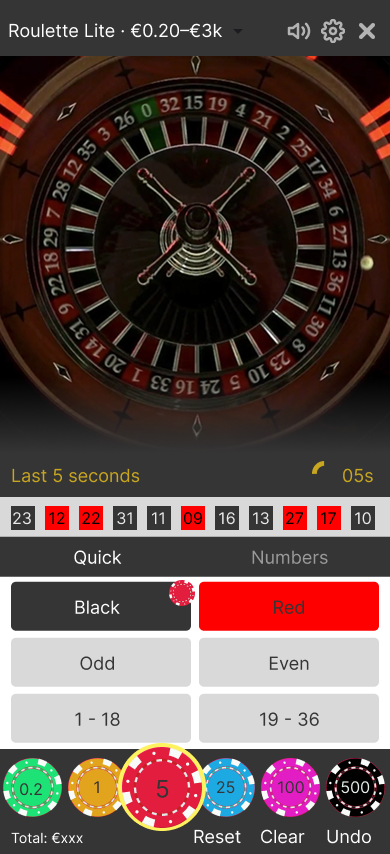
This is a concept exploring a mobile-first live roulette overlay for a “Roulette Lite” table. It focuses on outside bets (Red/Black, Odd/Even, 1–18/19–36), a simple number mode, and clear round states under time pressure.
Brief
Design a clean, thumb-friendly mobile UI that lets players place simple roulette bets quickly and confidently during a timed betting window. The interface should keep the live video as the hero, surface recent results, and make it obvious when betting is open, closing, or locked.
Research and moodboard

I started by collecting screenshots from several live roulette products to understand common patterns: video-dominant layouts, outside/inside bet controls, chip rails, and result/history displays. I used these only as structural references and then simplified them for a “Lite” experience.
Sketch and layout
Next, I sketched the main flow on paper:

Top bar with table name and limits
Live video block
Phase + timer strip and recent numbers
Bet mode tabs (Quick / Numbers)
Large outside-bet buttons
Chip rail and actions pinned at the bottom
This helped me balance the vertical space and keep important interactions within thumb reach on mobile.
Components and interaction states
In Figma, I created a small component library:
Top bar with table name, limits, and utility icons.
Phase + timer module with three states: Place your Bets, Last 5 seconds, No more bets.
History strip showing recent results as red/black/green chips.
Bet mode tabs: Quick (outside bets) and Numbers (simple number picker).
Outside bets grid: Red/Black, Odd/Even, 1–18 / 19–36, with selected/disabled states.
Chip rail with multiple denominations and a clear selected chip.
Actions: Reset, Clear, Undo.
I wired these into a prototype so tapping Quick/Numbers switches modes, and the UI transitions through the main round phases with a timed delay.
Key screens



What I focused on
Clear hierarchy between video, status (phase + timer + history), and controls.
Large, readable outside bets with high contrast and obvious selection.
Subtle but clear transitions between round phases so players always know whether they can still place bets.
Prototype
Figma file (view only): https://www.figma.com/design/jLiYlvDtMpQqYN7fLqUCng/Roulette-Lite-%E2%80%93-Mobile-UI-Concept?node-id=0-1&t=awJLRaTGHssLYzz6-1
“Roulette Lite - Mobile UI Concept (Figma prototype)” - interactive exploration of Quick/Numbers modes, outside bets, chip rail, and round states. https://www.figma.com/proto/jLiYlvDtMpQqYN7fLqUCng/Roulette-Lite-%E2%80%93-Mobile-UI-Concept?node-id=0-1&t=awJLRaTGHssLYzz6-1


Comments